Hack into a Computer running Windows XP that is password protected!
This is to hack into a windows xp protected computer without changing the password.
This makes windows xp accept any password.
Here are the steps:
1. The first step is that you need physical access to there machine and it must have a CD or DVD drive.
2. Download this file
3. Unzip the file folder and you will get the dpl.iso
4. Use a burning program that can burn iso images such as UltraISO, PowerISO or Nero.
5. After you have the disk, boot from the CD or DVD drive. You will see Windows 2000 Setup and it will load some of the files.
6. Press "R" to install Dreampackpl
7. Press “C” to install DreamPackPL by using the recovery console.
8. 8. Select the Windows installation that is currently on the computer (Normally is “1″ if you only have one Windows installed)
9. Backup your original sfcfiles.dll by typing:
“ren C:\Windows\System32\sfcfiles.dll sfcfiles.lld” (without quotes)
10. Copy the hacked file from CD to system32 folder. Type:
“copy D:\i386\pinball.ex_ C:\Windows\System32\sfcfiles.dll” (without quotes and assuming your CD drive is D:)
11. Type “exit”, take out disk and reboot.
12. In the password field, type “dreamon” (without quotes) and DreamPack menu will appear.
13. Click the top graphic on the DreamPack menu and you will get a menu popup.
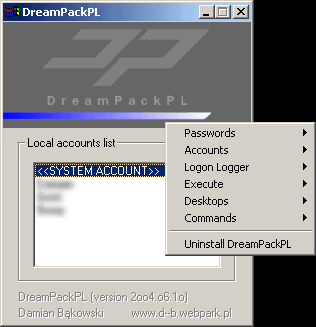
14. Go to commands and enable the options and enable the god command.
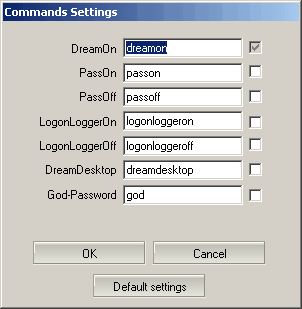
15. Type “god” in the password field to get in Windows.
If you have a anti virus running in the background, it might label it as a hack tool. A hack tool is not a virus. and i assure you the file i gave you is clean and no viruses are in it or associated with it.
This makes windows xp accept any password.
Here are the steps:
1. The first step is that you need physical access to there machine and it must have a CD or DVD drive.
2. Download this file
3. Unzip the file folder and you will get the dpl.iso
4. Use a burning program that can burn iso images such as UltraISO, PowerISO or Nero.
5. After you have the disk, boot from the CD or DVD drive. You will see Windows 2000 Setup and it will load some of the files.
6. Press "R" to install Dreampackpl
7. Press “C” to install DreamPackPL by using the recovery console.
8. 8. Select the Windows installation that is currently on the computer (Normally is “1″ if you only have one Windows installed)
9. Backup your original sfcfiles.dll by typing:
“ren C:\Windows\System32\sfcfiles.dll sfcfiles.lld” (without quotes)
10. Copy the hacked file from CD to system32 folder. Type:
“copy D:\i386\pinball.ex_ C:\Windows\System32\sfcfiles.dll” (without quotes and assuming your CD drive is D:)
11. Type “exit”, take out disk and reboot.
12. In the password field, type “dreamon” (without quotes) and DreamPack menu will appear.
13. Click the top graphic on the DreamPack menu and you will get a menu popup.

14. Go to commands and enable the options and enable the god command.

15. Type “god” in the password field to get in Windows.
If you have a anti virus running in the background, it might label it as a hack tool. A hack tool is not a virus. and i assure you the file i gave you is clean and no viruses are in it or associated with it.
Labels: computers, hacks, tweaks, windows xp
posted by Options Traders at
10:51 AM
0 Comments


